
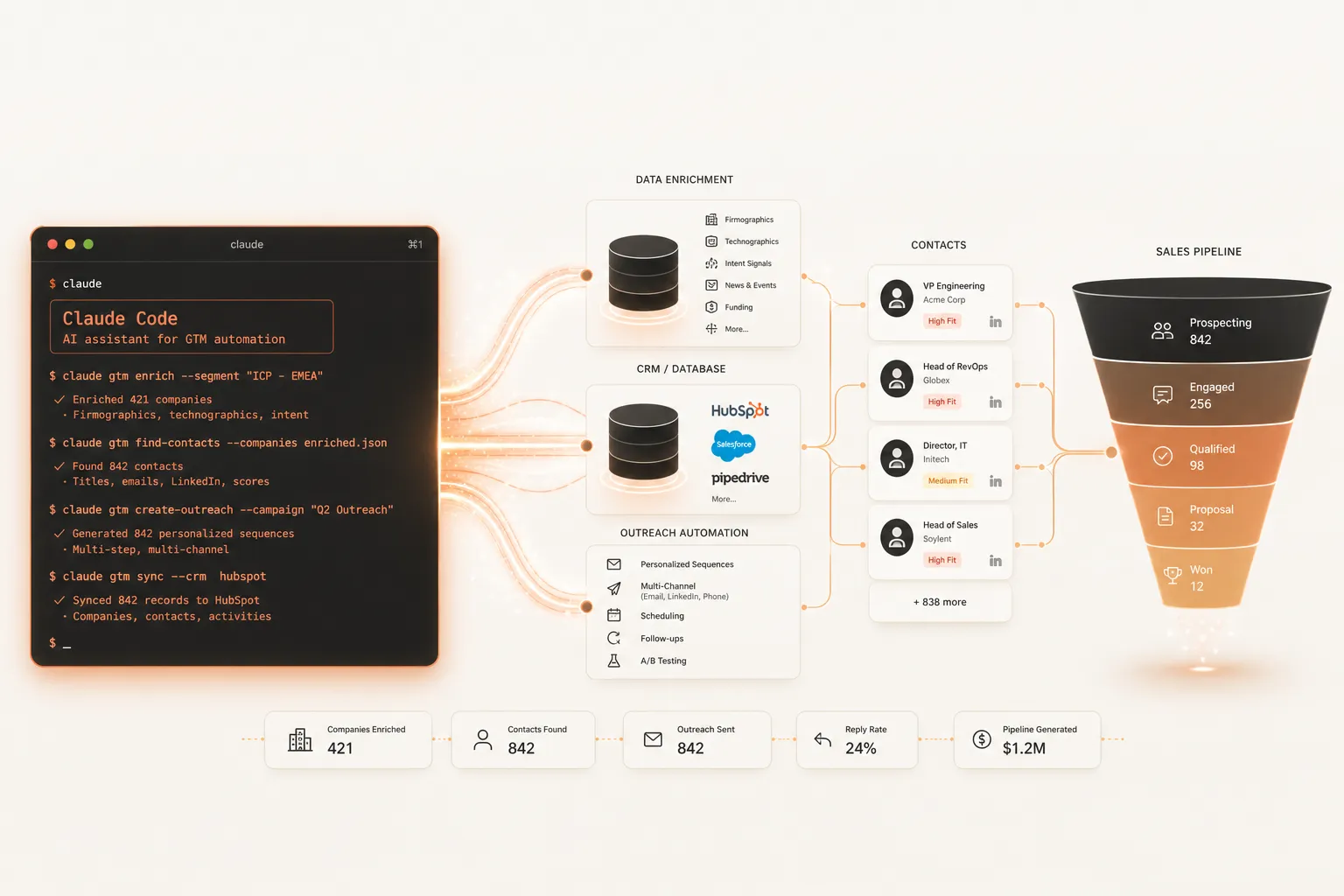
Most GTM engineers spend 60–80% of their week on work that shouldn't require a human: researching prospects, enriching contact lists, writing personalized outreach, and cleaning stale CRM records. Claude Code changes that equation. It's not another SaaS tool you log into — it's an agentic CLI that scrapes, enriches, writes, and acts across your entire GTM stack from a single terminal window. GTM teams using it are quietly outproducing competitors 3–5x their size.
What Is Claude Code and Why Are GTM Engineers Adopting It So Fast?
Claude Code is Anthropic's agentic command-line interface that lets AI take multi-step actions across your tools, files, and APIs — not just respond to prompts. For GTM engineers, it means a single Claude session can research a prospect list, enrich each row via API calls, score leads against your ICP, write personalized sequences, and push records to your CRM — with no UI switching.
Claude Code hit a $2.5 billion run rate by February 2026. Weekly active users doubled over the same period. It now accounts for roughly 4% of all public commits on GitHub, projected to exceed 20% by December 2026.
The reason GTM teams love it isn't just speed — it's scope. Traditional automation tools (Zapier, Make, n8n) are great at executing a defined sequence. Claude Code can reason through a sequence it's never seen before. When a workflow hits an unexpected data format or a missing field, it adapts. Fixed scripts break. Claude Code figures it out.
The practical result: workflows that previously took a full engineering sprint can be deployed in minutes. Campaign setup time drops by 50%+ compared to pre-Claude Code approaches within the first month of adoption.
Key Takeaway: Claude Code is an agentic CLI — not a chatbot. It takes sequences of actions across APIs, files, and tools without switching between UIs. GTM engineers use it to collapse multi-hour manual workflows into single terminal sessions.
What GTM Workflows Can Claude Code Automate End-to-End?
Claude Code can automate six core GTM workflows: lead sourcing, data enrichment, CRM cleanup, outreach personalization, competitive intelligence, and buying-signal processing. Each workflow runs in sequence within a single Claude session, chaining research, scoring, writing, and API calls without manual handoffs.
In a 2026 survey of 200 GTM operators, 54% reported they were building workflows that didn't exist before — not just doing existing workflows faster. Here's what those workflows look like in practice:
1. Prospect Research & ICP Scoring
Claude Code can scrape a company website, parse job postings for technology signals, check LinkedIn for headcount changes, and score the account against your ICP criteria — all before you've touched a spreadsheet. What used to take 10–15 minutes per prospect takes seconds.
2. Waterfall Enrichment
Feed Claude Code a list of domains. It queries Apollo, Hunter, and Clearbit in sequence, only paying for each lookup when the previous one fails. Same logic as AI lead generation waterfall enrichment — except you're scripting it yourself in an afternoon.
3. Personalized Outreach at Scale
Claude Code pulls signal context per prospect — recent funding, tech stack, LinkedIn activity — then writes first lines that reference something specific. Teams using signal-based personalization report 5–7x higher reply rates compared to cold template blasts.
Need a fully built waterfall enrichment system? That's one of the core workflows in Agentyug's lead generation service.
4. CRM Cleanup and Enrichment
Connect Claude Code to your HubSpot or Salesforce via MCP (more on that below). Ask it to find contacts missing job titles, companies with no industry tag, or deals stuck in the same stage for 30+ days. It reads, scores, and updates records in bulk — no manual CSV exports.
5. Competitive Intelligence Digests
Claude Code can monitor competitor pricing pages, job listings, and product changelog blogs, then generate a structured brief with what changed, what it signals, and what it means for your positioning.
6. Buying Signal Processing
When a target account has a job posting for a Head of RevOps, hires a new VP of Sales, or gets a new funding round — those are signals. Claude Code can pull these events daily and route high-scoring accounts into your active sequence.
Key Takeaway: Claude Code automates all six high-ROI GTM workflows — from research to CRM sync — in a single session. 67% of GTM operators using it have built workflows that were previously impossible with no-code tools.
How Do You Connect Claude Code to Your CRM Using MCP?
You connect Claude Code to your CRM using Model Context Protocol (MCP) — an open standard that lets Claude read and write to external systems via structured tool calls. HubSpot has a native MCP connector. Salesforce uses the @salesforce/mcp package. Once connected, Claude Code can query, create, update, and delete CRM records in natural language.
MCP is the technical backbone of the modern GTM engineering stack. Instead of writing raw API calls or managing brittle middleware, you configure an MCP server once and Claude Code handles the rest.
Here's the setup for HubSpot — under 10 minutes from scratch:
- Install the HubSpot MCP connector via
npm install @hubspot/mcp-server - Add it to your Claude Code MCP config (
~/.claude/settings.json) - Authenticate with your HubSpot API key
- Start a Claude Code session and type: "Show me all deals created in the last 7 days where the company is missing a phone number"
Claude Code returns the results, then you can tell it: "For each of those contacts, search Hunter.io for a verified email and update the record." It executes that in sequence. No code, no Zapier zaps, no CSV imports.
For Salesforce, the same pattern applies via the @salesforce/mcp package. You configure SOQL access scope, connect your credentials, and Claude Code can run queries, update records, and generate pipeline reports from natural language instructions.
Building custom MCP servers for your own internal tools — proprietary databases, internal APIs, custom data pipelines — is exactly what Agentyug's MCP server development service is built for.
Key Takeaway: MCP servers let Claude Code read and write CRM records via natural language, with no raw API calls. HubSpot has a native connector; Salesforce uses @salesforce/mcp. Custom tools need a custom MCP server.
What Does a Real Claude Code GTM Workflow Look Like Step-by-Step?
A real Claude Code GTM workflow starts with a target list and ends with personalized sequences ready to send — in one terminal session. The sequence: define ICP → source domains → enrich with APIs → score against criteria → write personalized first lines → push to CRM or sequencing tool. Average task completion drops from 3.1 hours to 15 minutes.
Here's a concrete example — building a prospecting campaign for B2B SaaS companies with 50–200 employees that recently raised a Series A:
Step 1: Source the Raw List
"Using Crunchbase data, find 50 SaaS companies in the US that raised Series A in the last 90 days, have 50–200 employees, and are in the HR or finance vertical."Claude Code calls the Crunchbase API, parses results, and returns a structured CSV.
Step 2: Enrich Each Row
"For each company, find the Head of Sales or VP of Revenue on LinkedIn. Pull their name, title, LinkedIn URL, and any posts from the last 30 days."Step 3: Score Against ICP
"Score each contact 1–10 based on: company headcount growth in 6 months, tech stack (HubSpot = +2, Salesforce = +2), recent hiring in sales = +2, funding amount above $5M = +1."Step 4: Write Personalized First Lines
"For the top 20 contacts (score ≥ 7), write a 2-sentence personalized first line referencing their most recent LinkedIn post or the hiring signal you detected."Step 5: Push to CRM
"Create a contact record in HubSpot for each of the top 20, add them to the 'Q2 Series A Outbound' list, and tag them with the signal source."Total time: 15–20 minutes for a campaign that would have taken a full SDR team half a day. This is exactly the model behind why companies are replacing SDR teams with GTM engineers — one person with Claude Code outproduces a team of four.
Key Takeaway: A complete Claude Code GTM workflow — from sourcing to CRM — runs in 5 steps inside a single terminal session. The 3.1-hour manual workflow becomes a 15-minute agentic one.
How Does Claude Code Compare to n8n, Make, and Zapier for GTM Work?
Claude Code handles reasoning-heavy tasks with variable inputs; n8n, Make, and Zapier handle deterministic pipelines with predictable logic. The best GTM stacks use all four: Zapier for quick integrations, Make for visual mid-complexity flows, n8n for high-volume self-hosted automation, and Claude Code for judgment calls, unstructured inputs, and edge cases.
Here's how they compare across the dimensions GTM teams actually care about:
| Dimension | Claude Code | n8n | Make | Zapier |
|---|---|---|---|---|
| Setup | Terminal / code | Visual canvas | Visual canvas | No-code GUI |
| Best for | Reasoning, unstructured tasks | Complex, high-volume pipelines | Visual mid-complexity | Simple 2-step integrations |
| Handles edge cases | ✓ Yes (adapts) | ✗ Breaks on unexpected input | ✗ Breaks on unexpected input | ✗ Breaks on unexpected input |
| CRM integration | Via MCP | Native nodes | Native nodes | Native nodes |
| Cost at scale | $20–$100/mo (flat) | $20–24/mo + LLM fees | Per-operation pricing | Per-task pricing (expensive) |
| Technical skill | CLI comfortable | Low-code | No-code | No-code |
| Scheduling / reliability | Manual + cron | ✓ Built-in, mature | ✓ Built-in | ✓ Built-in |
| For GTM scripting | ✓ Excellent | ✓ Good for pipelines | ✓ Good for pipelines | ⚠ Limited |
The right answer for most GTM teams isn't Claude Code instead of n8n — it's Claude Code plus n8n. Use Claude Code to build and test the logic. Use n8n to schedule and run it reliably at scale.
This mirrors the broader GTM automation tool landscape for 2026 — the most effective stacks layer tools by strength, not replace one with another.
Key Takeaway: Claude Code beats no-code tools on reasoning and edge case handling. n8n and Make beat Claude Code on scheduling reliability. Top GTM stacks use Claude Code for intelligence and n8n for reliable execution.
What Claude Code Skills and Repos Should GTM Teams Install?
The fastest way to use Claude Code for GTM is to install pre-built skill repos — collections of Claude Code instructions and tool configurations purpose-built for sales, marketing, and RevOps workflows. The top repos cover prospecting, enrichment, outreach, CRM management, and competitive intel out of the box.
The best community-built GTM skill repos as of 2026:
sales-skills/sales(GitHub) — covers CRM, outbound, enrichment, email marketing, social listening, and directories. Install vianpx skills add sales-skills/sales.gtmagents/gtm-agents— production-ready collection of GTM agents for sales, marketing, customer success, and RevOps.gtm-skills.com— a commercial skill library with a free MCP server, ICP scoring, and signal processing pre-built.- ColdIQ's skill pack — 7 master skills, 52 sub-skills, and 137 sales triggers designed specifically for outbound.
These repos save you building from scratch. Install them, configure your API keys (Apollo, Hunter, LinkedIn), and you have a working GTM stack in under an hour.
For teams needing custom skill development — proprietary data sources, internal APIs, or bespoke enrichment logic — Agentyug's AI agent development service builds Claude-based agents tailored to your exact stack.
Key Takeaway: Pre-built Claude Code skill repos let GTM teams skip configuration and go straight to working workflows. The top repos cover every core GTM motion — install, configure API keys, and run.
How Do You Get Started With Claude Code for GTM if You're Not a Developer?
Non-developers can start with Claude Code for GTM by following four steps: install Claude Code, configure one MCP server (HubSpot is the easiest), install a pre-built GTM skill repo, and run your first workflow using plain English prompts. You don't need to write code — you need to know your ICP and be able to describe your workflow clearly.
If you can write a brief for a human SDR, you can brief Claude Code. The mental shift is treating Claude like a very fast, very capable junior analyst who needs clear instructions.
Your Week 1 starter plan:
- Day 1 — Install Claude Code (
npm install -g @anthropic-ai/claude-code) and set up your API key - Day 2 — Connect HubSpot via the native MCP connector (under 10 minutes)
- Day 3 — Install
sales-skills/salesrepo and run your first prospect research prompt - Day 4 — Build your first enrichment workflow: target domain list → email lookup → ICP score
- Day 5 — Push enriched records to HubSpot and trigger your first sequence
By end of week 1, you have a working prospecting pipeline. By end of month 1, it's running faster than any manual process you've used before.
For the broader strategic context on building a GTM function around this kind of infrastructure, read the 5 pillars of GTM strategy — Claude Code handles execution, but your strategy still needs to be right.
If you want this built for you rather than building it yourself, book a consultation with Akansh — one session maps your automation roadmap and identifies the highest-ROI Claude Code workflows for your specific stack.
Key Takeaway: Non-developers can start with Claude Code for GTM in one week using plain English prompts. Install, connect HubSpot via MCP, install a skill repo, and describe your workflow. No code required — clear thinking required.
Frequently Asked Questions
What is Claude Code and how is it different from Claude.ai?
Claude.ai is a chat interface — you ask questions and get responses. Claude Code is an agentic CLI tool installed on your computer that lets Claude take multi-step actions: read files, call APIs, run scripts, and act across your tools autonomously. For GTM teams, the difference is the difference between asking for advice and having someone execute the work.
Do I need to know how to code to use Claude Code for GTM?
You don't need to write code, but you need to be comfortable in a terminal and clear about describing workflows. Installing Claude Code, setting up MCP servers, and running prompts is closer to using a command line than coding. Pre-built skill repos reduce the setup friction significantly — most GTM teams are running in under an hour.
How does Claude Code connect to HubSpot and Salesforce?
Via MCP servers — Model Context Protocol integrations that let Claude Code read and write CRM records in natural language. HubSpot has a native MCP connector. Salesforce uses the @salesforce/mcp package. Once configured, Claude Code can query, create, update, and delete records without raw API calls.
Is Claude Code better than Clay for GTM enrichment?
They serve different purposes. Clay is a purpose-built data enrichment platform with a visual interface and 75+ pre-integrated data providers — ideal for non-technical GTM teams running waterfall enrichment at scale. Claude Code is better for custom logic, reasoning-heavy workflows, and tasks that need to adapt to unexpected inputs. The best approach: use Clay for structured enrichment, use Claude Code for everything that needs judgment.
How much does Claude Code cost for a GTM team?
Claude Code Pro is $20/month per seat; Claude Max is $100/month per seat. Both are flat fees that include all LLM usage. For context, running the same research and writing tasks via raw API calls would typically cost more. Most GTM teams see Claude Max paying for itself within the first day of use on time saved.
Can Claude Code replace my SDR team?
It can replace the research and personalization functions of an SDR role — but not relationship-building or complex discovery calls. One GTM engineer with Claude Code produces the same top-of-funnel output as 2–4 SDRs. Most companies are eliminating SDR headcount for research roles while keeping senior SDRs focused on relationship management and late-stage work.
Sources
- Claude Code for GTM Engineers: Building Pipeline Without Engineering Headcount, Landbase
- How GTM Teams Use Claude Code: 6 Workflows That Replace Manual Ops, SyncGTM
- Is the Claude Hype Real? We Asked 200 GTM Operators, GTM Strategist
- Claude Code MCP Servers: A Practical Guide for GTM Teams, Databar.ai
- n8n vs Claude Code vs Agentic Workflows: How to Choose the Right Automation Stack, MindStudio
- GitHub — sales-skills/sales: Claude Code skills for sales, marketing, and GTM, GitHub